
Medulla keeps your scribe encounters for a period you choose, then deletes them permanently. The default is three months. You can shorten it if your clinic prefers to hold less, or lengthen it up to a year if you refer back to older sessions.
This is a personal setting, so each clinician in a practice sets their own.
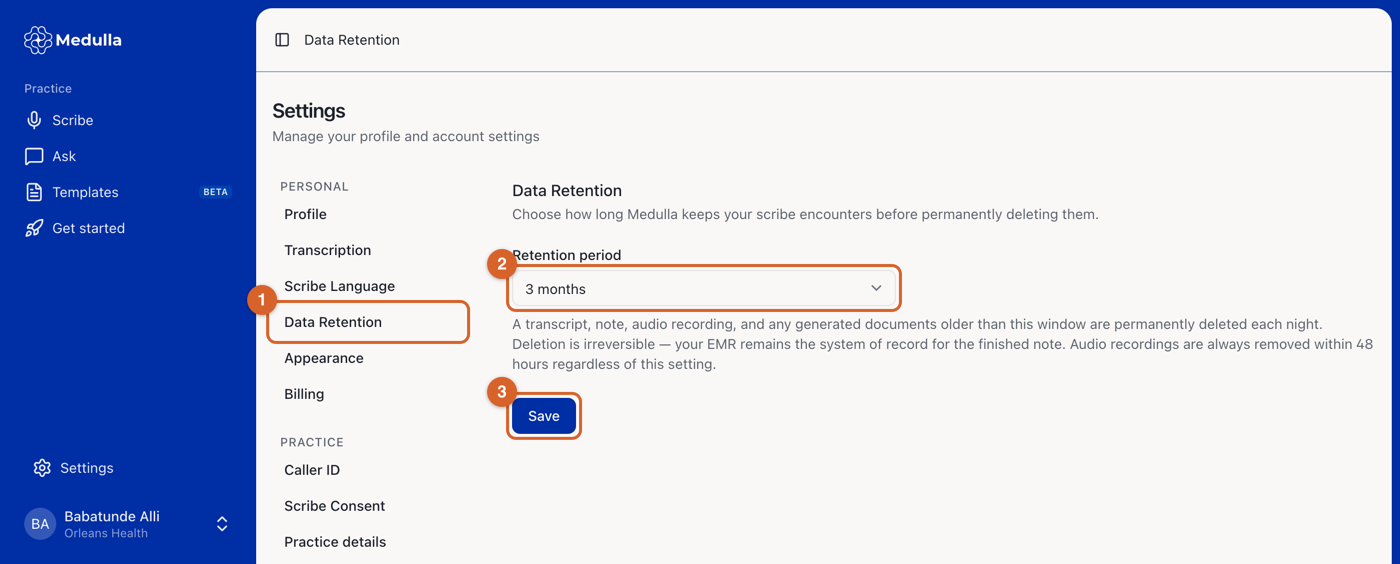
In the Medulla web app, go to Settings and select Data Retention.
Choose a Retention period. The options are 2 days, 1 week, 2 weeks, 1 month, 2 months, 3 months, 6 months and 1 year.
Click Save.
What gets deleted
Once an encounter is older than your retention period, Medulla deletes it during that night's clean-up. Everything attached to the encounter goes with it:
the transcript and the clinical note
every generated document, such as a patient handout or referral letter
the audio recording
any records you attached to the session
the billing suggestions
The session itself stays in your list as a dated entry with its contents removed, so your history and your monthly encounter count stay accurate.
Deletion cannot be undone. Medulla is not your medical record, so copy the finished note into your EMR. That is what your chart is built from.
Audio is always short-lived
Audio recordings are removed within 48 hours no matter which retention period you choose. The period you set applies to the transcript, note and documents; it does not extend the recording.
That is also why a transcript can only be rebuilt from the original recording within 48 hours of the encounter.